Read a trace
The concept behind usage, audit and traces is explained in Insight.
A trace shows the request Core sent to a model provider and the response it received. Core also adds a readable interpretation. Use traces to investigate unexpected answers or missing tool calls.
Core may make several model calls during one turn, for example during tool rounds. Each model call
gets its own trace. This also applies to requests with store: false.
Your key needs no separate capability to use traces. Trace storage must be enabled for both the deployment and the organisation. A trace can contain the full input and output, so take this into account when configuring storage and retention.
The two routes
| Route | What it answers |
|---|---|
GET /responses/{response_id}/trace |
the calls one turn made, oldest first, a fallover's retry as its own entry |
GET /traces/{call_id} |
one call, and the document behind it |
The list is a page like every other list in this API: ?limit= and ?cursor= in, {items,
next_cursor} out (Requests). It reads no stored bytes and leaves no audit row.
curl -s https://<your-core>/api/v1/responses/resp_01J.../trace \
  -H "Authorization: Bearer $ARTIFIC_API_KEY"
Each entry carries the call's id, its kind, the model you asked for and the model that answered, how it ended, when it started and finished, the tokens the provider reported, the size of its document, and whether that document was cut.
And the tool executions that call's answer asked for, as tool_calls on the entry itself. One
page of a turn is therefore the whole tree — turn, round, and what each round ran — with no second
request. Each execution names the tool, where it came from, how it ended (ok, error, denied
or cancelled), the fixed code behind a failure, the status the tool's own destination answered
where there was one, when it ran, and which model call received its result. A call whose answer
asked for no tool carries an empty list. A tool your own application runs — a function tool —
has no entry here: Core never ran it. A tool the model reached through the tool
router is listed under its own name with routed: true, and each of
the router's searches carries in refs how many tools it ranked (candidates), its hits with
their scores, and keyword_only when it ranked by keyword alone.
What a document holds
GET /traces/{call_id} answers the call again with a document beside it, in three sections.
request is the body the provider received, in the provider's own shape — an OpenAI
chat.completions body, an Anthropic messages body — and not Core's view of it. observed says
whether those are the bytes seen on the wire or the client's own prepared payload, for the two
provider families whose connection Core cannot watch. headers_omitted is always true: no
request header is ever recorded, which is why no API key of yours or of Core's can be in here.
response is the provider's raw answer: the final body, or — for a streamed call — the ordered
chunks and no assembled body, since assembling an event stream is the provider's protocol rather
than its answer. A call that failed carries the provider's own error body where Core can read one.
interpretation is Core's own reading of the same call:
elements— every context element in the order it was sent, with itsauthority(core,developer,delegate,user,model), itstrust(trustedoruntrusted), where it came from, the rows behind it insource_ids, and a JSON pointer intorequest.bodyat its text. Followtext_refinto the body and you read the element's words out of the very bytes the provider received; it points into that provider's shape, so on an Anthropic body it leads intosystemor into a block ofmessagesand on a Gemini body intocontents. An emptytext_refis Core saying it could not place the element, never a guess.authorityandtrustare what Core knew about the element, not what the model was told: the list opens with a preamble element only when the turn's key holdstrust_envelope, and without it anuntrustedelement was sent as plain text.elements[].tool_calls— what a round asked for, where it asked for anything: the tool's name, the model's own call id, andarguments_ref, a pointer at the arguments as the provider received them. A round that only called tools has no text of its own, socharactersis0andtext_refis empty — the calls are what that round was.pseudonyms— every placeholder standing in those elements, with its entity type and its offsets (Hide personal data).tools— every tool this call decided about, withoffered,denied_by_policy,withheld_by_capability,withheld_for_subject(meant for another subject, such as a service account's own mailbox),hidden_argumentsorrouted(behind the tool router) and the fixed reason behind it. The ones that were not offered are what usually answers "why did the model not use that tool".blocks— the memory and summary blocks injected beside your own messages, and the rows each was built from. For memory,dropped_by_countis how many matching records a count left out (the key's limit, a store's limit or the deployment's ceiling),dropped_by_budgethow many did not fit the token budget or what the turn's ceiling left, andestimated_tokenswhat the block costs. Askillsentry, with no text, names the skills retrieval injected: itsdropped_by_countis how many matching skillsretrieval_top_kleft out, and itsestimated_tokenswhat the injected bodies cost. Atoolsentry, with no text, names inrecord_idsthe tools the router picked in advance for this turn, with the same three counts.routing— the chain this turn could fall over along, which model was attempted and which answered (Fallback).answer— what the model answered: its text, a refusal, the reasoning summary and the tool calls it asked for, with their arguments. Written on theokpath only, and only for a chat call, so a failed call, an embedding or an image has none.recovery— on a call that asked the model again for an answer a live check failed:attempt, the answer this call's text is checked as (from 2), andcheck, the first check the earlier answer failed. The rejected answer stays in the earlier call's trace and never reaches the conversation. Null on every other call.
A transcription
A recording transcribed by an audio model is a call of kind transcription. Made by the
transcription tool, it belongs to the turn that called the tool. Made on
POST /audio/transcriptions or for an input_audio part, it is a job of its own, kind
audio.transcription, with the request id as its id. Its document differs from
a model call's in one way: neither section holds what the vendor received or answered. request
holds Core's own summary of what was sent (the model, the recording's media type and size in bytes,
the language, the prompt and the temperature), and response holds the transcript's length in
characters and the seconds of audio. The recording and the words in it are never in a trace. See
Transcribe audio.
Never in a trace
- Any credential. Your API key, a provider key, a tool's credential header: all of them are headers, and no header is read.
- What a placeholder stands for. A pseudonym span carries the placeholder, the entity type and
two offsets. To read the values, ask the conversation's own pseudonyms route
(Hide personal data), which exists for that and records the reading.
A turn whose
pseudonymisation.appliedevent readsrenumberedabove zero is the exception: its placeholders cannot be looked up there. - Anything of another organisation's.
Traces are your content
A trace falls under your organisation's data retention window like everything else your callers sent, and your administrator may give traces a shorter window of their own — never a longer one, because Core takes a trace at whichever window comes first. Erasing one person takes that person's traces with them (Build for people); deleting the organisation takes all of them.
Their bytes are reported separately from your files, as trace_bytes on
GET /usage/summary (Usage and audit through the API): a month of conversations is small and a month
of the bodies behind them is not, so the two figures are never added together.
A document read is an event
Listing that a call exists is free. Reading a document is not: every GET /traces/{call_id}
writes one trace.read audit event naming the reader and the call id, whether the reader is a key,
a person signed in to the console, or an operator. It is the first event in Core's trail that
records something that was seen rather than something that was done, and you will find it in your
own audit trail (Usage and audit through the API).
Opening a conversation in the console is the same act, several times over: it reads the document of
every call of the turns on the page, so it writes one trace.read event per call rather than one
for the page.
What a key may read
A key reads the traces of the calls it made. When your application names a person on its calls
(Build for people), a credential bound to one person reads that
person's traces, and -- where your deployment switches rule-based group threads on
(threads_group_reach_by_rule, off by default) -- the traces of every turn on a thread a rule
that names the person lets them see: in a thread several people write in,
each person reads the traces of the others' turns too. The list of a turn's calls never shows a
call that reading its document would refuse. A call made for nobody stays your key's: an ingest
run's anywhere, and on a thread a person may read, a summary of a long conversation or a turn your
backend made without naming a person. So does every call on a shared thread no rule names the
person on. Every document read is recorded with the person who read it.
If your organisation switched recording off, new calls are not recorded; what was recorded before stays readable until a retention window takes it.
The same calls in the console
Whoever administers your organisation reads all of it on the Traces section of the organisation, with filters and the three views of one document (An organisation's settings).
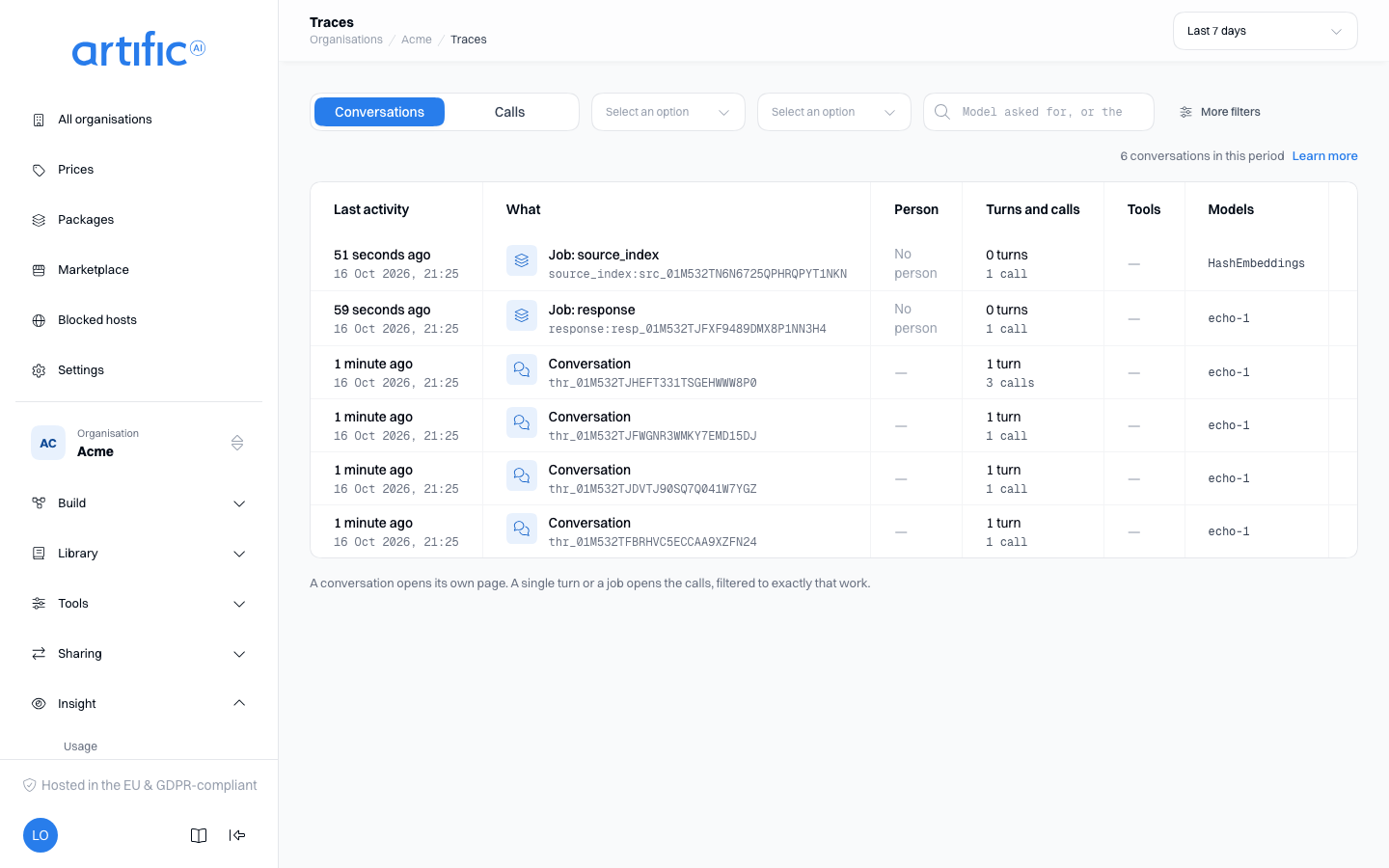
That section opens on Conversations rather than on the calls: the organisation's calls grouped into the conversation, the single turn or the job they belong to, newest activity first, with the turns, calls and tools each group holds and the failures among them marked. A conversation opens as the page below; a single turn and a job open the Calls view narrowed to exactly their own calls, since neither has a page of its own. Both views take the same filters, so the two are always about the same calls: the period sits in the page bar, kind, outcome and model in the row above the list, and More filters opens the person, the tool, the tool's outcome, the job and the response. Every filter in force is a chip you can remove on its own, and Clear filters removes them all. On a phone the bar's Filters opens every filter at once.
Search the messages from the box above Conversations: type words and press Search, and the list shows the messages that hold them instead of the groups, newest first, each with its author, the words around the match marked, the person and a link to its conversation. The period, the person and the response narrow the search; kind, outcome, model and tool are about calls and do not count while you search. A page reads a fixed share of the history, so when it finds nothing yet it says how far back it looked and offers Search further back. Every search is recorded on the audit trail with the messages it found, never with the words you typed.
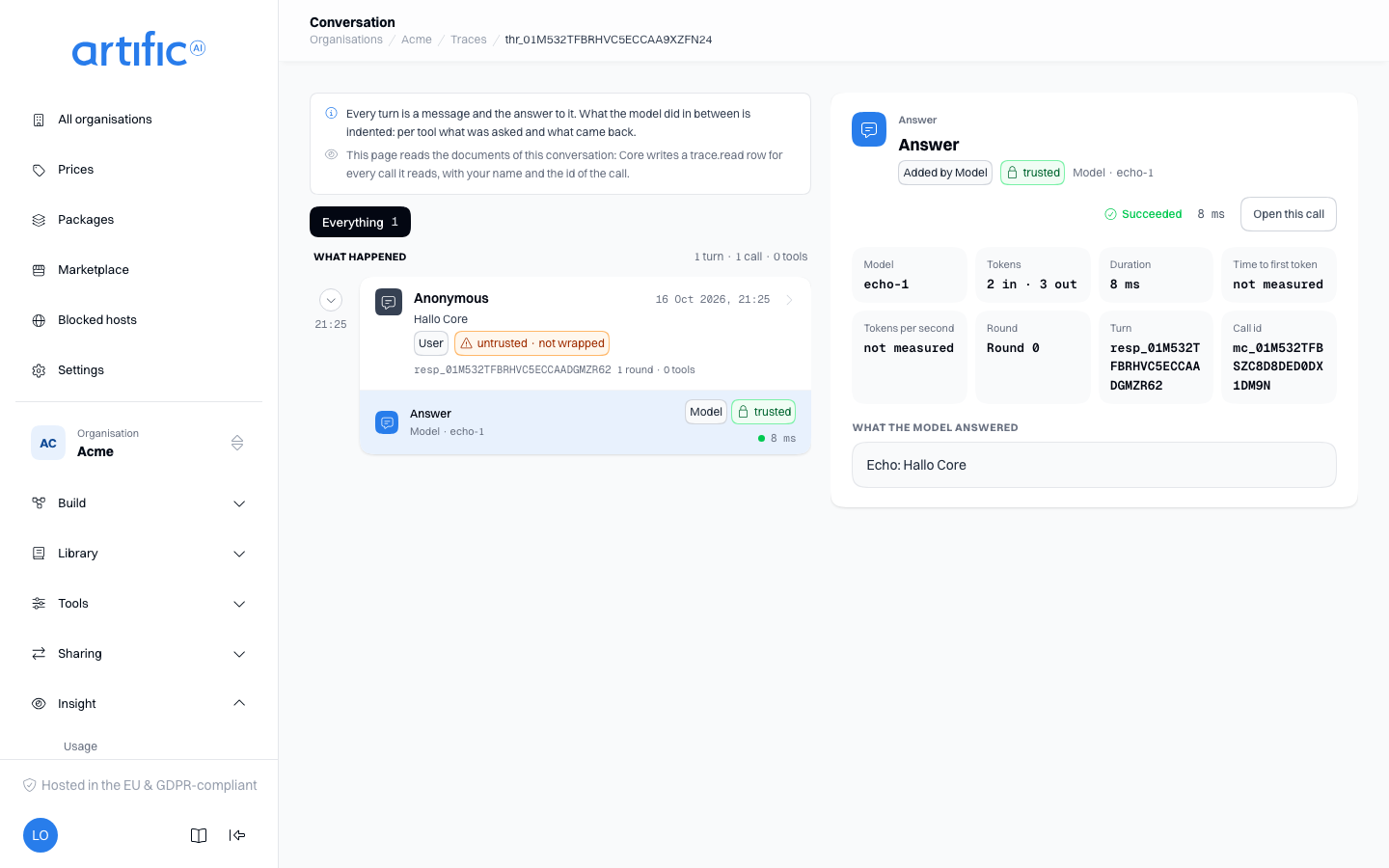
On a conversation's page, the card of a tool shows under Call variables the names of the call
variables the tool was handed out of the request's tool_variables, the secret ones marked, and
never a value: no trace holds one (Pass a customer's value to a
tool).
A call's page there shows the same document, laid out to be read. Its head names the model that
answered and how the call ended, then the call's facts as tiles — provider, chain, tokens,
duration, time to first token and generation speed, the document's size, the round, the error and
the job — and the request and trace ids to copy; every call of the same turn is one click away. On
the Context view a long element and every tool result open collapsed with a toggle and their
first lines, a round's tool calls are drawn with their arguments, and beside the elements are the
tools this call was offered or refused, the blocks Core injected and the placeholders the call
carried. The <untrusted source="…"> envelope Core wraps untrusted text in for a key that holds
trust_envelope is folded into the labels there — the
Request view keeps the bytes exactly as they were sent. A turn whose key does not hold the
capability was sent no envelope, so nothing is folded there and each element is drawn as the text
it is, under the same authority and trust labels. A notice above the elements, and on the
conversation page by that turn's message, says the call went without the envelope, and each untrusted label reads Untrusted · not wrapped: the text came from
outside, but the model was not told so. The Response view shows
interpretation.answer — what the model said, a refusal, the reasoning summary and the calls the
answer asked for, which is the one part of a streamed call that exists nowhere else — beside the
bytes that came back. When the first and the last byte came less than 100 ms apart, Tokens per
second reads not streamed: a speed over so short a window is a figure nobody measured. Time to
first token is still shown.
And a conversation is read as a conversation. The conversation on a row opens a page of its own, in two panes. On the left the conversation itself, oldest at the top and newest at the bottom, and the page opens at the bottom: the instructions the conversation was given, then a group per turn — the person's message, and under it what the model did: its thinking, each tool it ran as one box of what was asked and what came back, and the answer that went back. A compaction run Core started itself is a group of its own, where it happened. Fold a group to its head, or use the chips above the list to show only the asynchronous tools, the tool calls, the knowledge searches, the memory tools, the compaction steps or what failed. On the right is whichever card you pick, in full and on its own: a message shows what the person sent and not the answer, and the thinking of the call that answered stops before the answer, because the answer is a card of its own. The card is part of the link, and on a phone it opens on a screen of its own. Every card says whose words it is and whether Core could vouch for them, which is why a tool's box carries two sets of labels: the model wrote the arguments, and nobody vouches for what a tool hands back. A tool that did not work says why in Core's own fixed words, beside the status the tool's own destination answered, and every pseudonym placeholder is marked wherever it stands — never what it stands for. A model call leads to its own page, and a tool leads to the call whose answer asked for it. Earlier turns load above the flow, where they belong.
A tool your own application runs is in the flow too. Core never runs a function tool, so it
has no execution, but the conversation draws the call where the model asked for it, as a box marked
Run by your app: the arguments the model wrote, and as its result what your application sent
back as function_call_output, the way the next call was given it. Until your application sends
something back, or when the call that received it is not on the page, the result says so. A turn's
message card also lists Tools offered: every tool its first call decided about, with where it
came from — system, http, mcp, retrieval or client — as the call page lists them.
When your application answers such a call by continuing the response with only its
function_call_output, the turn that follows has no message of its own: its head says Your app
returned the result of show_chart. rather than repeating what the person said the turn before.
A tool that runs in the background is drawn from start to result. Where a turn started an asynchronous tool, its box says Asynchronous with the job id, and a Later line under it says how much later the result came in and whether the same turn or a later one read it, that no turn has read it yet, that the task ended without a result, or that it is still running, which a banner above the conversation says too. The turn that read the result shows where it landed, with the way back to the start, and a turn Core started itself to answer a result carries a bell and Woken by an asynchronous result, and its card leads back with To the turn that started it. How a tool comes to run this way is on Run a tool in the background.
This page reads the documents, and that is recorded. The Traces list reads rows only and
writes nothing; opening a conversation reads one document per call of the page, and each of those is
a trace.read line in the audit trail with the reader's name on it. The page says so above the
panes.
Where your deployment publishes a telemetry console, a call's trace id is also a link straight at that trace's spans; where it publishes none, the id is text you copy into whichever console you use.