Models: the catalogue and labels
The concept behind models and routing is explained in Models and routing.
Use Models to find the ids and properties of models configured for this deployment. Set the
request’s model field to the id you want to use.
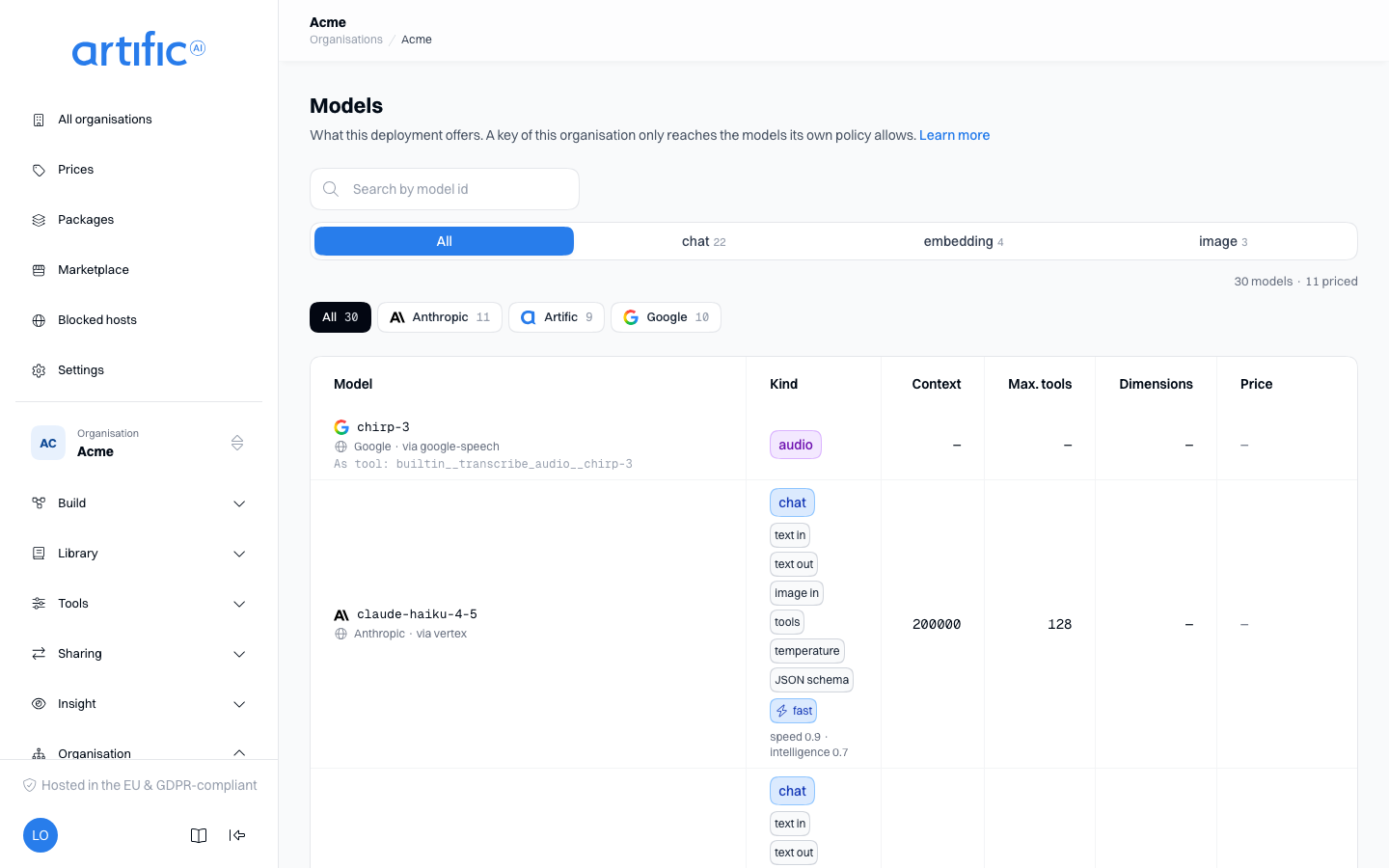
The catalogue itself is read-only: ask your operator to add or change a model. One thing you do set yourself, through the row menu (the three-dot icon), and that is Labels, the classification your organisation decides who reaches which model with.
Model details
| Column | Holds |
|---|---|
| Model | the name a call uses to choose this model, with the mark of the lab that trained it before it. Under it stands who runs the model and, with a small icon, where inference runs: a server for in-cluster, a globe for everything else. Hover a mark or read it with a screen reader for the name. A model whose lab is not recorded carries only the second line. A model that is being retired says under it until when it works and what replaces it. A model with labels of your organisation's own carries them under that. |
| Kind | chat for a turn, embedding for making things searchable, image for generating images, audio for turning recordings into text |
| Context | how many tokens fit in one turn, in and out together |
| Max. tools | how many tools one call to this model may carry; a dash for a model that takes no tools. A turn offering more is refused, unless it puts its tools behind the tool router |
| Dimensions | embedding only: the length of a vector |
| Price | what this model costs this organisation right now: per million tokens in and out (with a cache rate for input read from the provider's cache and a cache write rate for input written into it, where the price sets them), per image for an image model, or per minute of audio for an audio model (for an audio model billed in tokens, such as gpt-4o-transcribe, that minute is only the estimate the monthly cap checks before the call; the tokens are what is billed). Click it for the history. A dash means nothing prices this model. |
An image model also carries, under the model, the tool you call it through
(builtin__generate_image__<model>): such a model is not chosen with the model field, you give
the turn that tool. An audio model carries its transcription tool the same way
(builtin__transcribe_audio__<model>), and is also what POST /audio/transcriptions names in its
model field and an input_audio part in its own model
(Transcribe audio).
The model labelled default embedding model is used when a knowledge source or search does not specify one.
Lab
The lab develops the model, the provider runs it and hosting identifies its region. The same model may be available from different providers and in different regions.
Filter by lab above the table, as a row of buttons: All shows the full catalogue; Other contains models without a configured lab. Beside it you filter by model id and by kind; every button and tab counts how many models still fall under it. The filter operates on the fully loaded list. The same filters and marks appear in model selectors for agents, evaluations, routing, indexes and pipelines.
Price
The Price column shows the price in force for this organisation right now. Where it says your own price, this organisation has a price of its own for that model and the deployment's price does not apply to it. Where it shows a dash, Core costs the model as zero: usage then appears on Usage as without a price, and those records count as zero against a cap in euro as well.
Click the price for that model's price history: every recorded price, newest first, in the currency it was recorded in, each saying whether it is the deployment's or this organisation's own and from when it applies. A price is never changed, only superseded by one with a later start date -- which is how a period that has already been costed keeps the price it was costed at.
Prices are Artific's: the deployment has its own price for every model, and your organisation may have an agreed price of its own that wins over it. An organisation reads a price and never writes one -- what is charged is not the paying party's own choice. What your organisation adds on top, for itself or for the organisations below it, is a markup.
A price in another currency
A price is in the currency the model's vendor invoices in: a model charged in dollars has a price
in dollars. The Price column always shows euro. Under a price in another currency it also shows
the price as recorded, with the rate Core converted it by and the day the European Central Bank
published that rate, for example rate 1.1650 USD/EUR followed by the date. Core converts with the
newest ECB reference rate it holds.
So the euro amount moves with the rate, and so does the cost of a month, until your operator closes that month. Closing a month fixes the rate of every currency for that month, after which its cost no longer changes. The current month is never closed. Where Core holds no rate for a currency, usage at that price counts as without a price (Usage), like usage nothing prices.
Retiring models
Your operator can retire a model by choosing a date (in UTC) and a replacement: another model from the catalogue that takes its place. The model then carries a label:
| Label | Meaning |
|---|---|
| orange: works until date, then replacement | The date has not come yet. A turn naming the model still runs on it. |
| red: retired since date, now replacement | The date has passed. A turn naming the model runs on the replacement or is refused. |
What happens from the date on is yours to set, with Retired models in the policy of your organisation or of a key (Keys):
- Reroute to the replacement (
reroute), also when nothing is set: the turn runs on the replacement. The replacement goes through the same checks as if the request had named it: the key's policy, the regions and the fallback chain. The response names the replacement inmodel, and the usage is costed at the replacement's price. - Block (
block): the turn is refused with a message naming the date and the replacement.
Block wins: when the organisation's policy or the key's says Block, the turn is refused. A retired model on a fallback chain is replaced by its replacement the same way, or skipped when the turn blocks.
Only a turn's model is rerouted. A key's summariser, an evaluation's judge, an image model offered as a tool and a knowledge index's embedding model go on being called as themselves after the date, until you change the setting that names them. An embedding model can never be rerouted: an index's vectors belong to the model that made them, so moving an index means indexing it again.
How a caller sees this in the response is on Make a model call.
Still in use
While the catalogue retires a model, a Still in use section sits under the table: every place in your organisation that still names such a model. Move each to the replacement before the date.
| Column | Holds |
|---|---|
| Model | the model being retired, with its label |
| Where | what names it, with name and id: an Agent (its latest version), a Router (its latest version), a Routing configuration (a fallback chain), a Key (its summariser), a Schedule (its stored request), an Evaluation (its judge) or a Knowledge index (its embedding model) |
| Field | where in that configuration: model, tools (an image tool of the model), pool, chains, capabilities.compaction.model, request.model, request.tools, judge_model or embedding_model |
A knowledge index that names no embedding model of its own is listed too when the default embedding model is being retired, since that is what it embeds with. Core reads at most 500 rows per kind of configuration: when your organisation has more than 500 of one kind, agents for example, the list can miss places of that kind.
A key holding management reads the same list with GET /organisation/model-references,
cursor-paged. With ?model=<id> you ask about
one catalogue model, retiring or not.
A model that is to be retired within 30 days, or already has been, and that your organisation still names also produces one notification, by mail or in Slack.
Hosting
A key's policy can restrict which regions a model may run in (settings.regions_allow; see
Keys). A request can also require a region for the turn it answers with the
hosting field; see Make a model call. Both hold for every
model Core calls on the key's behalf, not only the one that answers: the summariser, a knowledge
pipeline's model steps, an image model and an audio model are each checked against the region
shown here.
Regions nest: in-cluster (this deployment's own infrastructure) and every EU member state lie
inside eu, and every region lies inside global. A model satisfies a list or a requested region
that contains where it runs, so a model hosted in nl satisfies eu, and a list naming global
admits every model; a model hosted global or in us does not satisfy eu.
A key can read the same regions itself: GET /models?kind=image, ?kind=audio and ?kind=embedding list those
models with allowed, GET /model-roles names the summariser and the embedding model, and
GET /knowledge/pipelines/{id}/models places a pipeline's model steps; see
Models your key reaches without naming
them.
Key policy
The console shows the full deployment catalogue. A key can use only the models allowed by its
policy, which Core checks on every call. Use GET /models with a key to list its
allowed models.
Labels
Open a model's row menu (the three-dot icon) and choose Labels… to edit its labels for your
organisation. For example, assign tier: premium and add a rule about Models that reads the
label to a key's policy (Rules about a person).
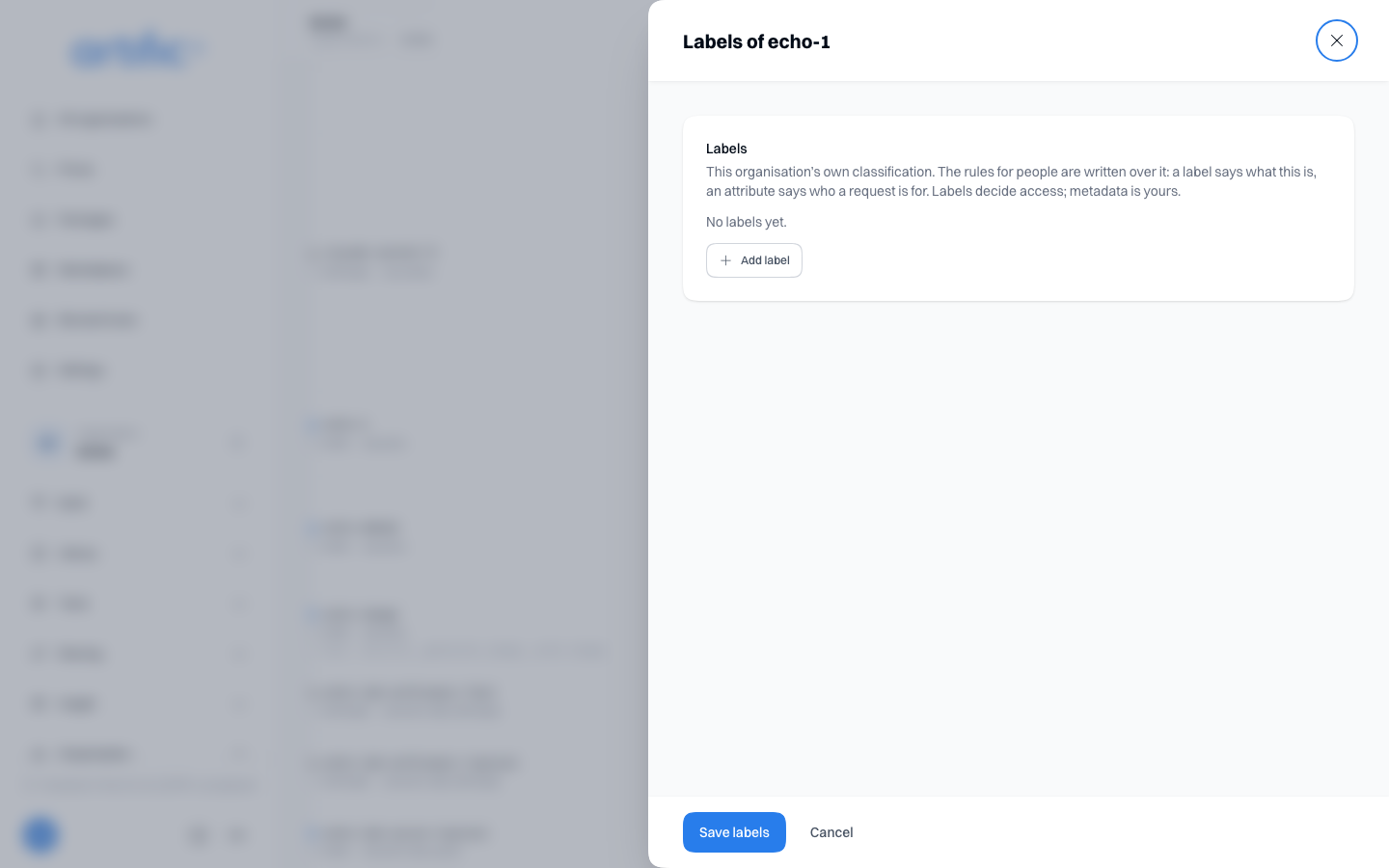
Core checks the rule before calling the provider. A model the person cannot access is also omitted
from GET /models. Models without the required label do not match the rule. The key's usual model
policy still applies.
See Build for people.
Empty catalogue
If you see “No models available”, ask your deployment administrator to check the model configuration.