Live checks in the console
The concept behind live checks is explained in Live checks.
On this page you give an agent live checks in the console, see how often each check passes, and read what the checks decided about one turn of a conversation. A live check is a rule every real turn of the agent is held to, on the question someone asked or on the answer the model gave.
You need an administrator account of the organisation, and the agents capability has to be on in
the organisation's ceiling; the pass rates also need evaluations, and a turn's results
threads. You do the same with a key in
Live checks through the API.
Add live checks to an agent
Live checks belong to an agent version, so you write them where you write the rest of the version:
- on Add agent, open the Live checks fold;
- on an existing agent, select New version and go to the Live checks row.
Select Add check. Each check is a card of its own, Check 1, Check 2 and so on, with a bin in its corner to remove it. A version holds at most 16 checks.
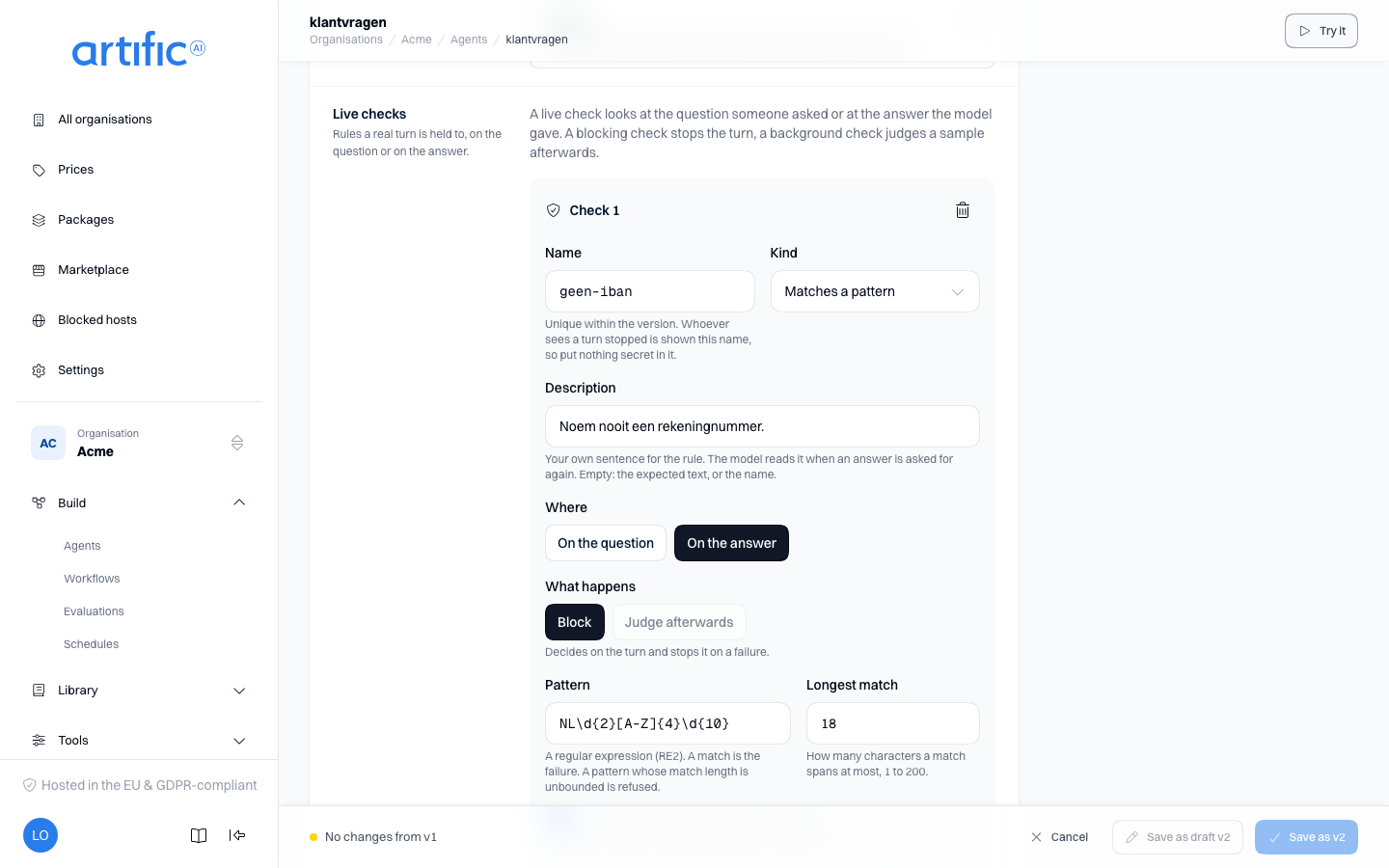
Fill in the card from the top. The fields further down depend on what you choose for Kind, Where and What happens, so only the fields that check uses are shown.
| Field | What you fill in |
|---|---|
| Name | lowercase letters, digits, - and _, at most 64 characters, unique within the version. Whoever sees a turn stopped is shown this name, so put nothing secret in it |
| Kind | the rule, see The kinds |
| Description | optional, at most 300 characters: your own sentence for the rule. When an answer is asked for again, the model reads it as the rule it broke |
| Where | On the question: what the caller wrote, before any model is called. On the answer: what the model answered. Uses a tool reads what the turn did, so it is on the answer only |
| What happens | Block: the check decides on the turn and stops it on a failure. Judge afterwards: a judge scores a sample of turns after they are done and never touches the turn; only for a judged kind on the answer |
| Expected | the text that must, or must not, be in it; for Uses a tool, the tool's name, or empty for any tool; for a judged kind, the rule the judge applies, in your own words |
| Pattern and Longest match | for Matches a pattern: a regular expression (RE2) whose match fails the check, and how many characters a match can span at most, 1 to 200 |
| Judge model | for a judged kind: the model that judges. Empty, the model the turn runs on judges. An agent whose model is a router has to choose one; so does an agent without a model of its own that callers call with a router, or the check cannot decide and, when it blocks, stops the turn |
| Threshold | for a judged kind: the score from 0 to 1 the check passes at; empty is 0.7 |
| Sample | for Judge afterwards: the share of turns judged, 0 to 1; empty is 0.1 |
| Ask for the answer again on a failure | for a blocking check on the answer: when the answer fails, the model is told the rule and tries again |
| Alert | optional: Failure share and Over the latest results, see Get an alert |
The form has no field for what a judged check does when its judge cannot decide (on_error); a
check you save here keeps the setting it has (A check's fields).
Under the checks are two fields of the version itself, each shown only while a check needs it:
- Standard reply to a blocked question appears as soon as a check on the question blocks, and is required then. It is what the caller reads when that check fails; no model is called. At most 1000 characters.
- Attempts when an answer is asked for again appears as soon as a check asks for the answer again: 1 to 3, and 2 when you leave it empty.
Save the version as you always do, with Save as v… or Save as draft v…. Saving as a draft lets you measure the checks with an evaluation before any key runs them (Drafts). Try it on the agent's page applies the checks of the version you try, as any call does: a refused question shows the standard reply, and a withheld answer reads "The answer was withheld by a live check." When Core refuses a check, the card shows Core's sentence under the field it is about.
The kinds
| Kind | The check fails when |
|---|---|
| Contains text | the text does not contain Expected, ignoring case |
| Contains no text | the text contains Expected, ignoring case |
| Matches a pattern | the text holds a match of Pattern |
| Uses a tool | the turn did not call the tool in Expected, or no tool at all |
| Correct format | a judge finds the answer does not match the format Expected describes |
| Polite tone | a judge finds the tone not professional, helpful and polite |
| No made-up facts | a judge finds something made up |
| A model’s own judgement | a judge finds the text does not meet the rule in Expected |
The last four are judged: each is one call to the judge model, on the key that ran the turn. Response time, a check an evaluation has, is not offered on a live check yet.
A pattern has to have a longest match. Core refuses a pattern that can run on without end, such as
.* or \w+, one whose match can be longer than Longest match, and one that matches nothing.
NL\d{2}[A-Z]{4}\d{10}, a Dutch IBAN, is always 18 characters long, so a Longest match of 18
fits. On a streamed answer, Core holds back that many characters before it sends them, which is why
the bound matters.
Read the checks of a version
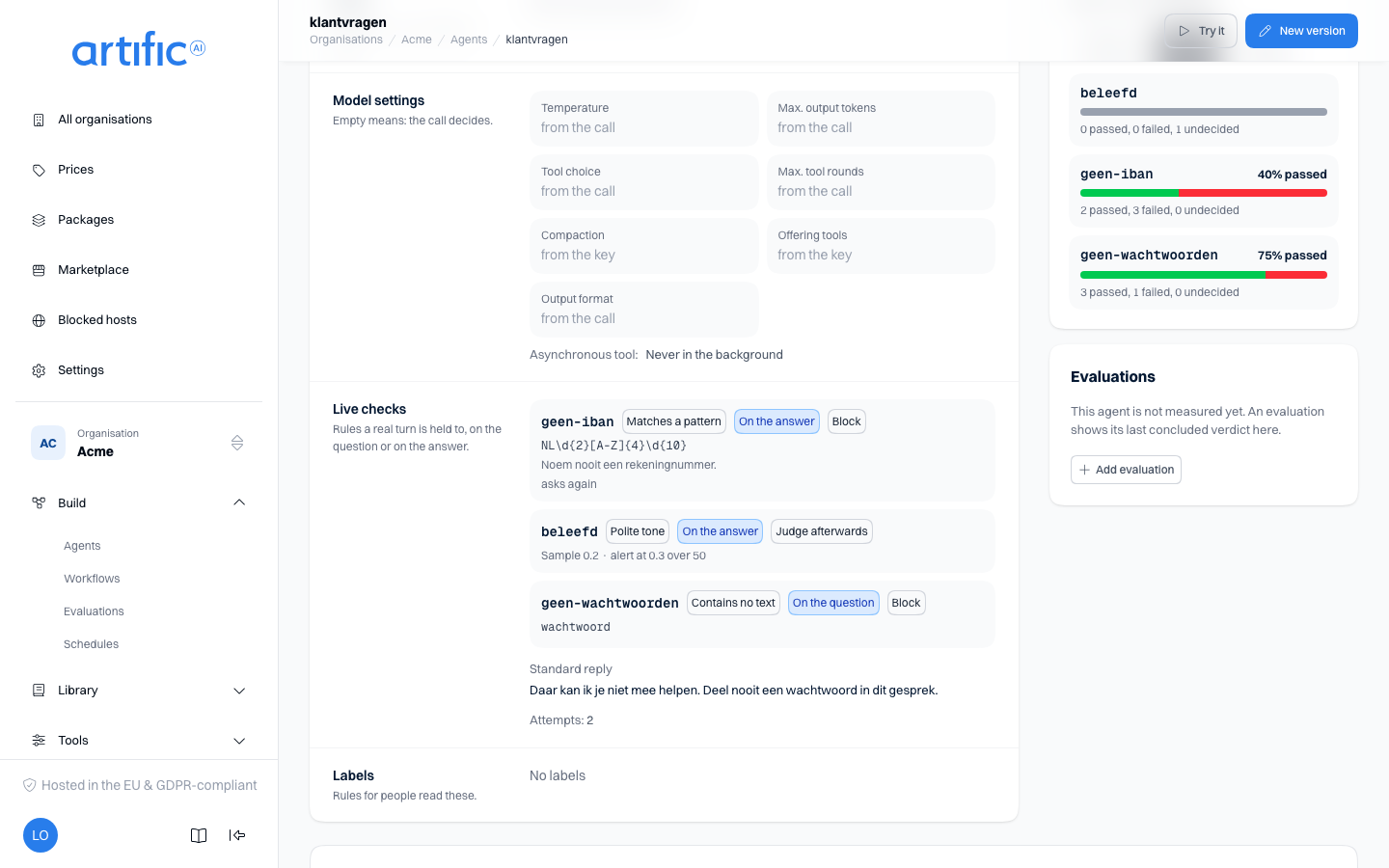
The agent's page shows the version you are reading. Its Live checks row lists each check on one line: its name, its kind, On the question or On the answer, Block or Judge afterwards, then the pattern or expected text, your description, and the threshold, judge, sample, asks again and alert where the check has them. The standard reply and the number of attempts follow under the list.
See how often a check passes
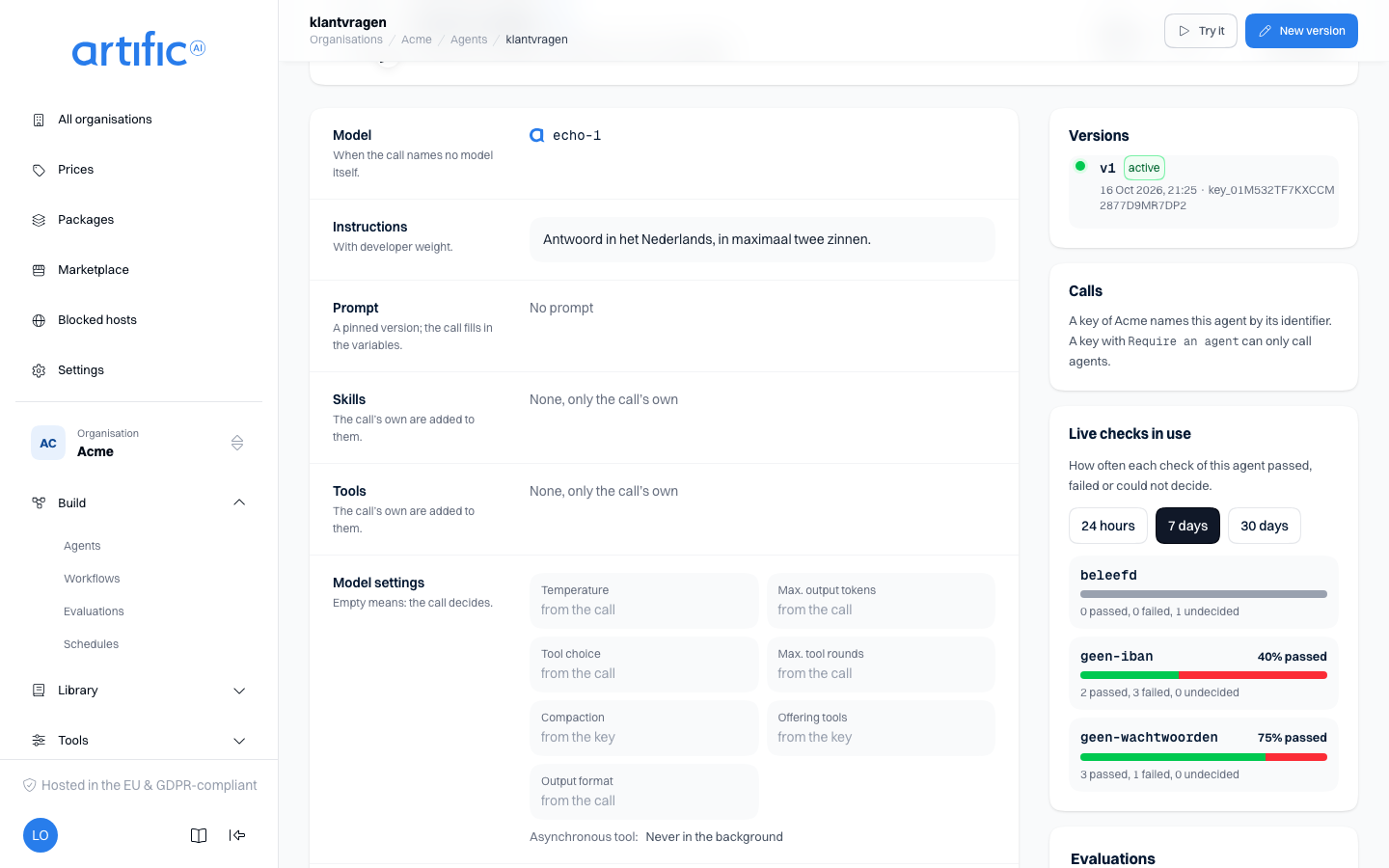
When the agent's latest version has live checks, its page carries the Live checks in use card at the side. Choose 24 hours, 7 days or 30 days. For each check the card shows the share of decided results that passed, a bar in three colours — passed, failed and could not decide — and the three counts. A result that could not decide is counted beside the others, never as a failure, so it does not lower the share. The counts include the results of every version of the agent.
"No check was applied in this window yet" means no check result of the agent was recorded in that period: no turn ran, or the turns that ran were of a version without checks.
Read what the checks decided about one turn
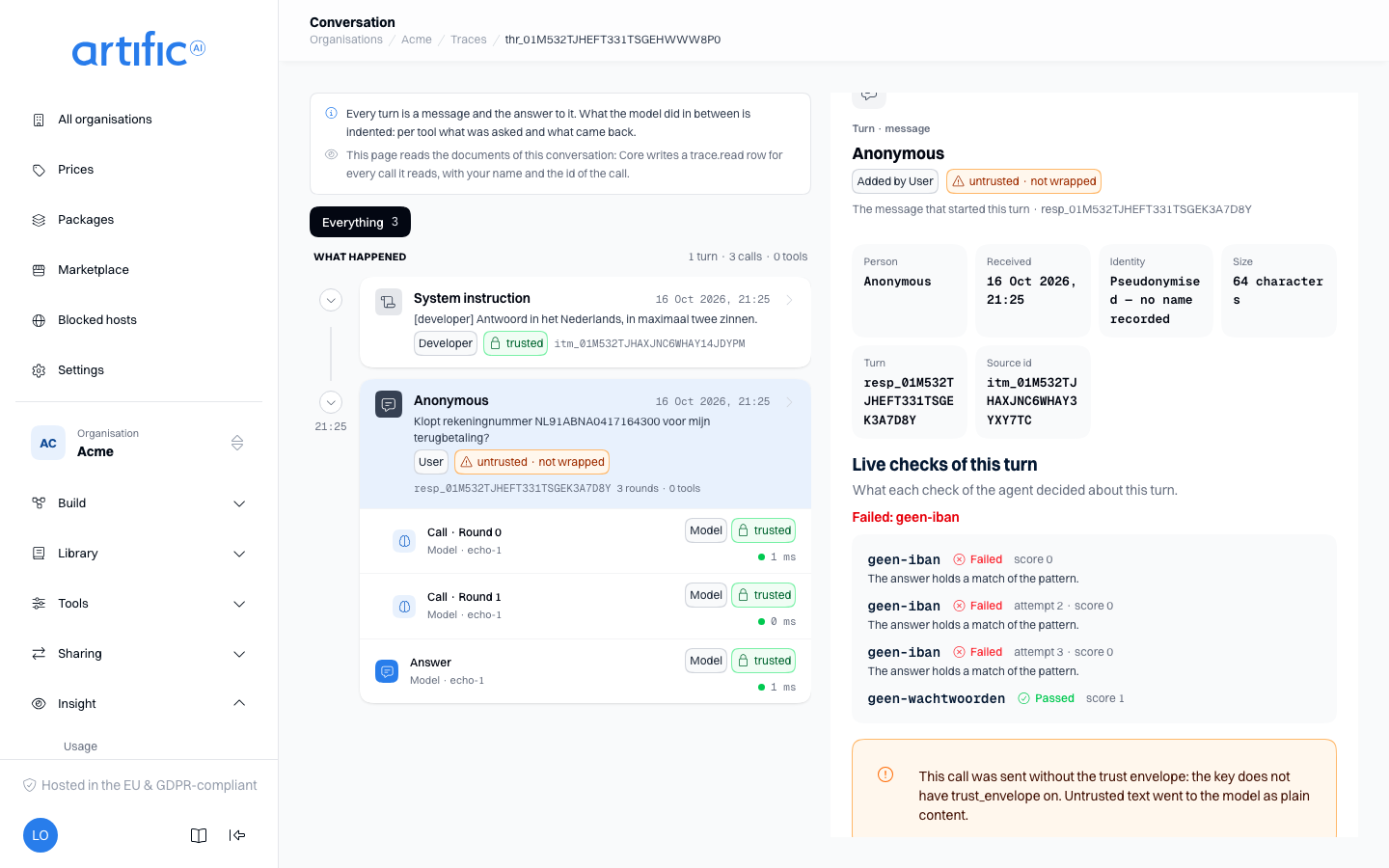
Open the conversation under Traces and select the turn's message in What happened. When a live check was applied to that turn, the card on the right holds Live checks of this turn: the names of the checks that failed in one red line, then one line per result with the check's name and Passed, Failed or Could not decide. A result that did not pass carries its reason: a fixed sentence for a rule, the judge's own sentence for a judged check. When the answer was asked for again, each result says which attempt it was about, and a judged result carries its score.
A turn whose question an input check refused made no model call, so it has no trace: under Traces its conversation shows nothing recorded. Read its results through the API (Live checks through the API).
A turn no check was applied to has no such section. A background check's result appears there only when the turn was in its sample, shortly after the turn, once the judge has scored it. See Read a trace for the rest of the conversation's page.
Get an alert
Under Alert on a check, fill in Failure share (above 0, at most 1) and Over the latest results (1 to 1000). Once the check has that many results and the share of them that failed or could not decide reaches the failure share, the organisation's administrators get a Live check failing notification by mail or Slack, at most once a day per check. A failure share of 0.3 over the latest 50 results alerts when 15 of the last 50 did not pass.
The notification names the agent and the check, never a question or an answer. Where it goes, and the switch that turns the kind off, are on the Notifications card (Notifications).