Audit in the console
The concept behind usage, audit and traces is explained in Insight.
On Audit you review the management changes and the API activity of an organisation. The Management and Calls and product events sub-tabs show separate event histories. You use it to find out who changed something, or why a call was refused.
You need an administrator account of the organisation. When the organisation above reserves the audit trail, Calls and product events shows one line saying so in place of the table (below). A key reads its own events in Usage and audit through the API.
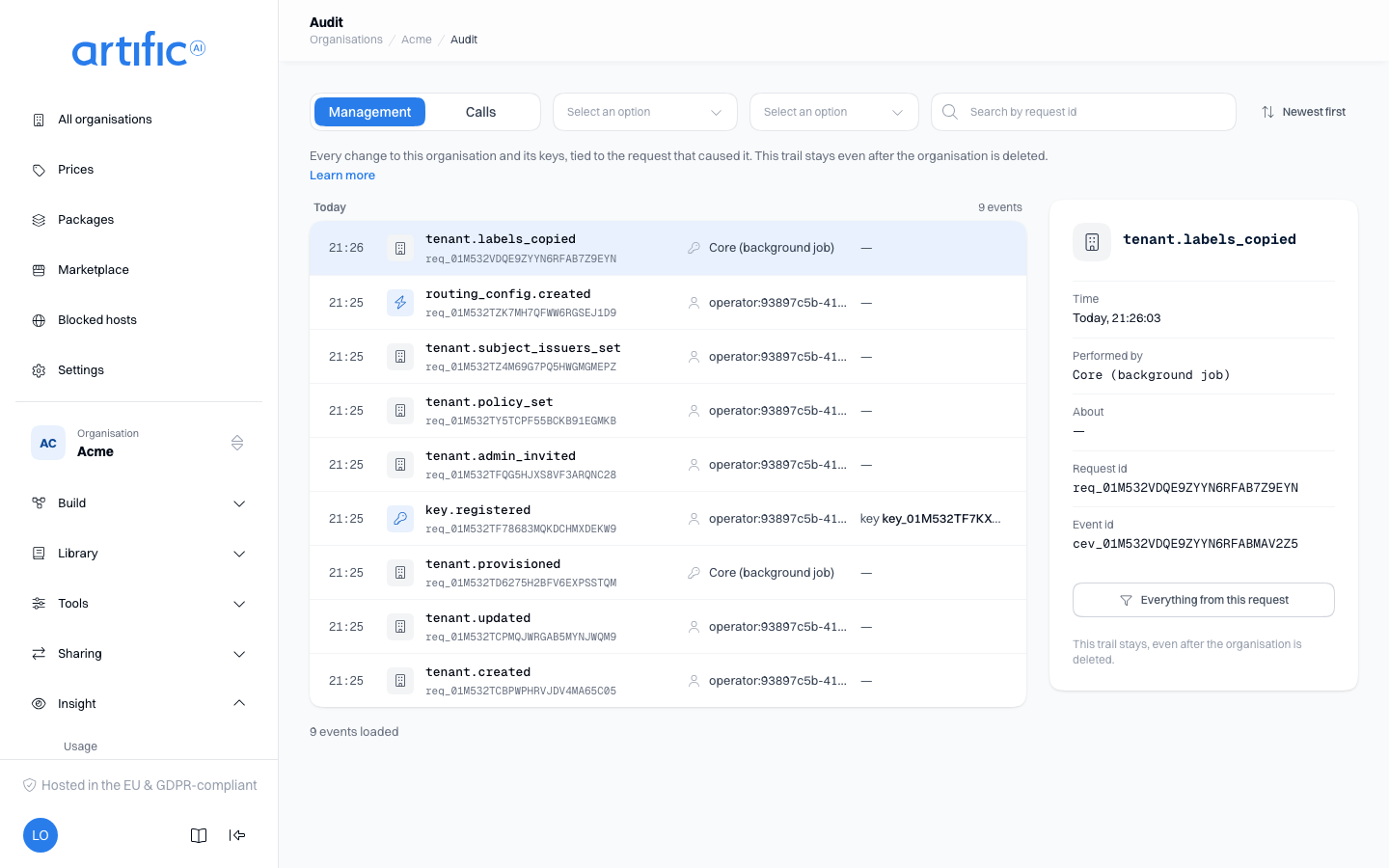
Management events
This history records changes to the organisation and its keys: creation, renaming, suspension and deletion, plus key registration, updates, rotation and deletion. Each event includes the request that caused it.
Management records are retained after an organisation is deleted, so its administrative history remains available.
Call events and product events
This history records responses, tool executions, prompt rendering, skill loading, file creation,
artifact production and memory writes. Each policy check produces a policy.decision event,
including denied requests. Use these events to investigate both successful activity and blocked
attempts.
Events from your product
An organisation can have a product built on Core, one that delivers its own events to the same
trail: a role it assigned, an export someone downloaded. Those events appear on this sub-tab among
Core's own, and every line carries an Origin badge: Core, or the product's display name.
The Origin dropdown narrows the trail to Core's events or to one product; Core applies it to
the whole trail, not only to the lines already loaded. The pane shows the product and its namespace under Origin, the moment the product itself gave
under Happened at (as the product said) (the time Core recorded it stays under Time), what
the event was about under About, and each field it changed as its own line. An operator names
the product on the organisation's details, in the Namespace and Display name fields; a key
needs the product_events capability to deliver
events (Usage and audit through the API).
Policy decisions
A policy.decision line shows the outcome beside the event, allowed or denied, and under
About what was decided on, such as tool_execution · denied. Select the line and the pane
beside the trail says why, under Policy: denied, in up to four parts separated by ·:
| Part | What it shows |
|---|---|
| Reason | permitted by a rule; forbidden by a rule, when a Forbid rule matched; or no rule permits, when one of the documents holds no Permit rule that matches |
| Kind | What the rule is about, in the words of the rule list, such as Tools |
| Document | Whose rules decided: the organisation's document, the key's document, or default rules for a call that was not made with a key, such as the work of a person in the console |
| Rule | rule and the name shown on that rule's row in the Rules list: the name you gave it, or its position. Missing under no rule permits, because no rule decided |
A refused web search reads, for example, forbidden by a rule · Tools · the organisation's document · rule no-web-search. To see or change that rule, open the document the line names — the policy card on the organisation's Settings, or the key's own page — and look for the row with that name.
A decision no rule made keeps Core's own sentence as its reason, such as model hosted outside the key's regions or key requires an agent, and names no rule. The line never shows a pattern, a label or a label's value.
When the organisation above reads the trail
With the audit trail reserved by the organisation above (Reserved), Calls and product events carries one line saying so instead of the table. Management stays yours: that is the trail of changes to the organisation itself and to its keys.
Event details
The events run per day, newest first, each day headed by its name and how many of the loaded events fell on it. A line shows the time, the event, who did it and what it was about. Select a line and the pane beside the trail shows that event in full:
| Detail | Description |
|---|---|
| Time | The day and the moment the event occurred |
| Performed by | The key's name with its id, or operator: with the subject id of the administrator who acted |
| About | The key, database or decision the event referenced |
| Request id | X-Request-Id of the originating call |
| Event id | The event's own id |
The chosen event is part of the link, so a shared link opens on the same event. On a phone the event opens on a screen of its own, with the way back to the trail.
Newest first is the default; select it to flip the order to oldest first. The order is part of the link too.
Find a request
Enter the call's request id in Search by request id to find its events, or select Everything from this request in the pane to narrow the trail to the event's own request. Check both sub-tabs as needed. The same id links the call to its usage records.
Where an event names a trace, Open in Traces opens it: the call a trace.read event read, or
the calls of the turn the event was written in (Read a trace).
Use the Event and Performed by dropdowns to narrow the results. These filters, part of a request id and Everything from this request narrow the events already loaded; loading more widens what they can find. A whole request id on Calls and product events is looked up in the whole trail, however long ago the call was made. The next page loads by itself as you scroll near the end of the list; select Load more to load it without scrolling.
Who made a call
Core records a key by its id only. The console looks the name up from this organisation's keys
and shows it on the line and in the Performed by dropdown; in the pane the name links to the
Keys section, with the id beside it. A key id the console finds no name for is shown
with "(not in the key list)". That says only that the lookup found nothing: the key may be
deleted, it may belong to an organisation above this one that acted here, or this organisation may
have more keys than the console looks names up for. The event stays whichever it is. Work Core
carries out itself, such as an export or a scheduled run, reads "Core (background job)". An
administrator's event shows operator:....
Content and credentials
- Message content, filenames or caller-supplied text. The audit history contains references and counts; conversation content is stored with the conversation.
- The end user behind an application key. Machine calls are attributed to the key id; the name comes from the console's lookup (see above).
- API key secrets, hashes or display prefixes.