Keys and policy in the console
The concept behind keys and policy is explained in Keys, capabilities and policy.
In the Keys section you register an API key for each application that calls Core. You set its capabilities, cap and policy there, rotate a secret and revoke a key. Creating a key through the API is in Hand out, rotate and withdraw keys.
You need an administrator account of the organisation. When the organisation above reserves key management, you can read keys and not change them (Reserved key management).
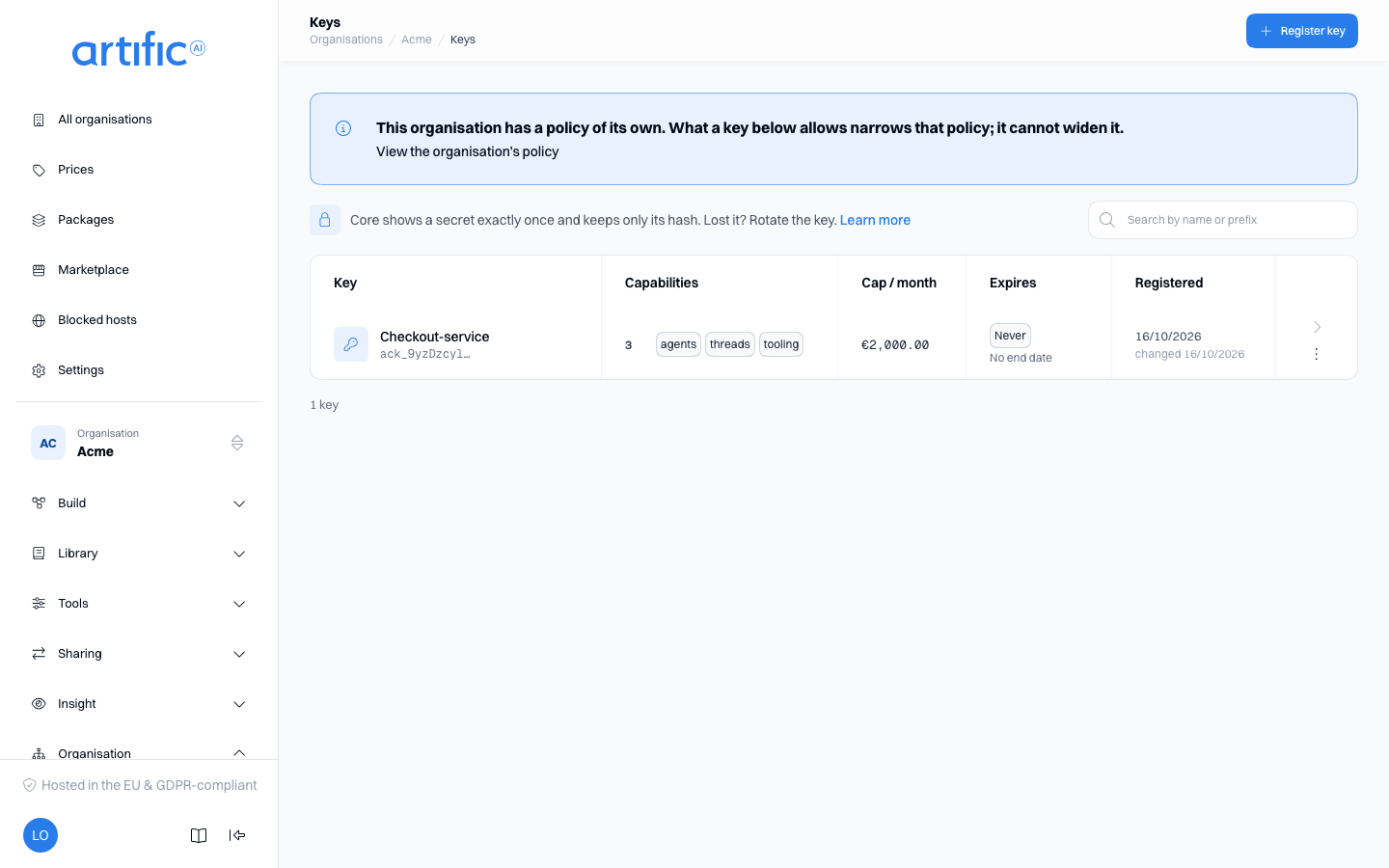
Create a key and save its secret
- Select Register key. The form opens as a page of its own, in three steps.
- Under Name and limits, enter a name, and a cap and an expiry if you need them. A key's name
is unique among your organisation's keys: registering a key under a name another key already
has, or renaming one to it, is refused
409. - Under What may this key do?, enable the capabilities the application needs.
- Narrow is optional: the policy and the fallback routing stay folded until you open them, and you can change them later on the key's own page. Beside the form stand the organisation's ceiling and what this key falls over to.
- Select Register in the bar at the bottom, then copy the secret from the dialog and store it securely. Closing the dialog returns you to the list.
- Give the secret to the application owner through your usual credential-sharing process.
Core cannot display the secret again. If you lose it, rotate the key to create a new secret. The dialog closes only with its own button; Esc and clicks outside it do not dismiss it.
The Key column shows the prefix under the name, the first twelve characters, to help identify the key. The prefix cannot authenticate a request, so there is no copy button next to it. The search field above the table searches the loaded keys by name and prefix. Under the table stands how many keys there are, how many expired and how many expire within 30 days; when there are more keys than are loaded, those numbers count the loaded keys only.
In a narrower window the list shows fewer columns (Cap / month and Registered go first, then Capabilities); a key's own page always shows them.
Capabilities
Enable capabilities on the key's own page, or while registering it. You can only enable capabilities the organisation permits. Disabling one here affects this key only.
The console checks dependencies: memory requires knowledge, background runs require conversations,
tasks and workflows require background runs and conversations, and artifacts require files. Enable the dependency before enabling the feature that uses it.
memory's own configuration fields -- retrieval and write tools, automatic injection, decay -- are
on Memory through the API.
Enable management and this key administers the organisation itself from the API — renaming it,
handing out its keys, creating the organisations below it and running those — exactly as an
administrator does in this console; give it to few keys, because such a key can register another
key with management (permitted capabilities). What
the key can then do from the API is on Manage organisations through the API.
Enable tooling and a second list appears beneath it: the system tools this key may use. Each
one is off by default until you check it here. What each tool does is covered on
Offering tools (subagent),
there (fetching and searching pages),
there (generating images),
there (Write a document),
there (Transcribe audio),
there (List files, Move files, Rename files and
Delete files, each its own checkbox, so the model can list files without being allowed to
change them) and on Computers through the API (Use a computer, which also needs the key's computer
capability). Read the platform log is shown only on keys of the platform's support organisation,
the one organisation that may use it. A key elsewhere that already holds the switch still shows it,
checked, so you can clear it; it does nothing there. In the support organisation a key with
Read the platform log, Read a platform trace or Read the platform alerts must expire
within seven days: the form asks for Expires on before it saves, and Core refuses such a key
without it. Register a new key when it lapses.
Below the system tools, Tool search lets this key's turns offer their tools through the tool router instead of all at once; the fields are on An agent with many tools.
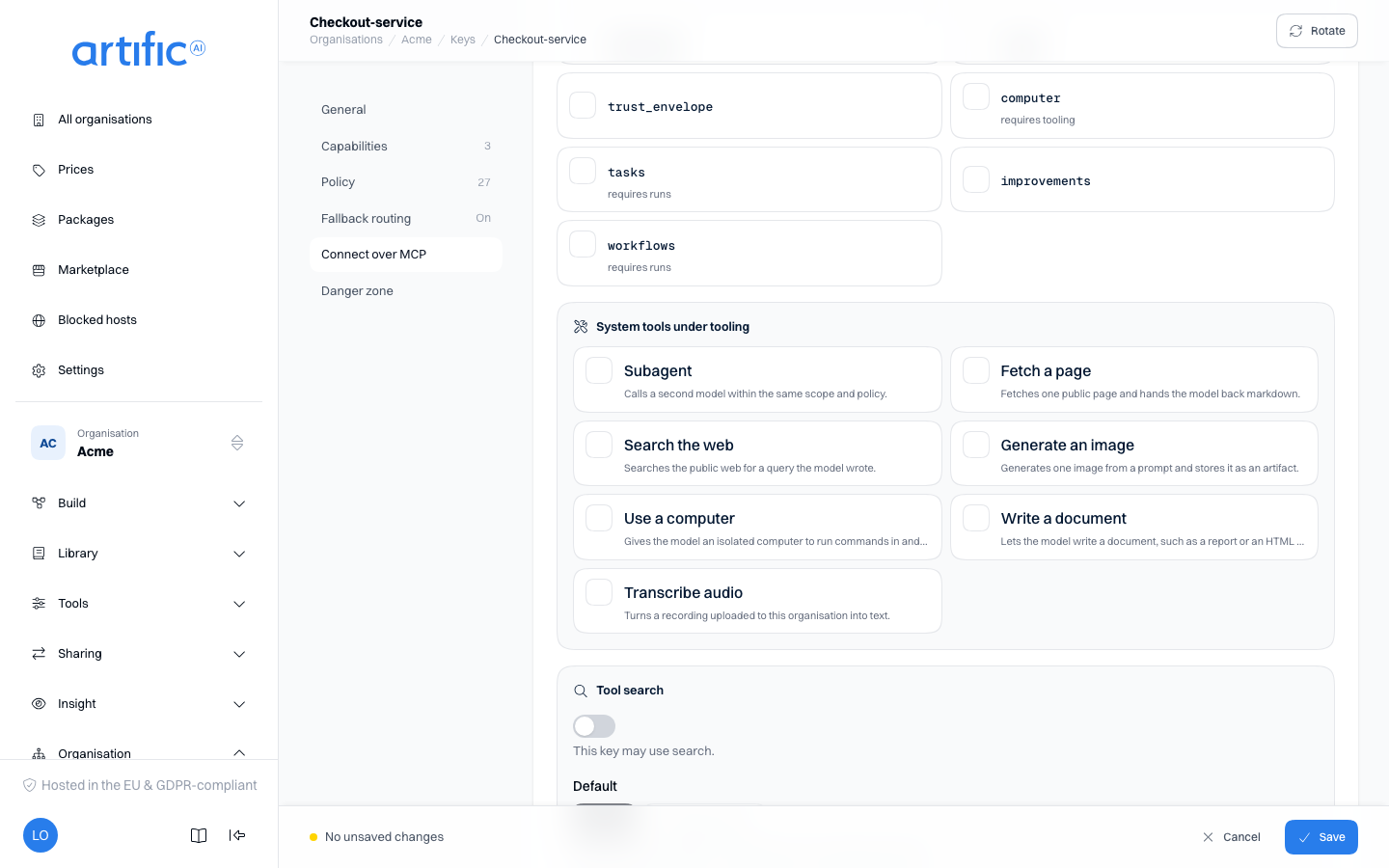
trust_envelope decides what the model is told, not what the key may reach: with it enabled,
this key's turns open with Core's preamble and wrap every user message and tool result in
<untrusted>, so the model knows which text is data. It is unticked on a new key. Leave it off for
a key a coding agent uses; enable it for a key whose turns read
documents nobody reviewed and call tools that change something. Keys that existed before the
capability was introduced have it enabled. See The trust_envelope
capability.
Monthly cap
Beside the name sits Monthly cost cap (euro): a ceiling on what this one key may spend in one calendar month (UTC), counted over everything that has a price -- tokens, images, tool invocations, searches, parsed pages, crawled pages and sandbox time. What the key stores is not one of them: storage is a gauge and never counts against the cap. You fill it in when registering and change it on the key's own page.
- Empty is no cap.
- 0 is a real cap: the key then spends nothing that has a price until the month turns.
- Clearing the field while editing lifts the cap.
- Type the amount with a point, such as
250.00; that is what Core stores, to the cent.
The organisation's own cap (Settings) applies alongside it regardless: a wider cap on a key does not widen the organisation's. What each key has spent is on Usage.
Expiry
Beside the cap sits an optional Expires on: the moment this key stops authenticating anything. Set it when registering or change it on the key's own page.
- Empty is never -- the key works until you rotate, delete or expire it yourself.
- Pick a moment in the future; a moment already past is refused.
- Clearing the field while editing lifts the expiry.
Past that moment, the key is refused exactly as an unknown one is: the same 401, nobody calling
it is told a key ever existed here, and a subject token minted from that key stops working the
same moment the key does. Rotating a key never resets its expiry -- rotation replaces the secret,
not the lifetime.
Policy
A key's policy decides what the key reaches inside its organisation: which models, tools and
destinations, which prompts, skills, agents and knowledge, and which conversations, memory, files
and datastore rows. Core checks it on every request. An application reads its own policy with
GET /key.
On a key's page, and under Narrow while registering, the policy is two cards: Rules, one list of rules, and Settings. Each rule permits or forbids one kind of thing. Three facts decide what the list means:
- Forbid always wins. What one rule forbids, no other rule permits.
- Nothing is allowed without a rule that permits it. An empty list permits nothing.
- The organisation's document and the key's document must both allow it. If the organisation has a policy of its own, a key can narrow what stands there and never widen it.
The rules have no order, so there is nothing to sort: moving a rule up or down would change nothing.
Read the list
Each row is one rule. It shows a Permit or Forbid chip, the rule as a sentence, and under
the sentence the rule's name. A rule without a name is called by its position in the list, counted
from 0, such as rule 3. The audit trail uses the same name.
| A row reads | It means |
|---|---|
| Permit · Models by any name. | Every model may be used |
| Forbid · Tools named builtin__web_search. | That one tool is refused, whatever another rule permits |
| Permit · Conversations, when label subject is the person's own id. | A person reaches her own conversations |
| Permit · Conversations, with label subject empty (a shared row). | Everybody reaches the conversations that belong to nobody in particular |
| Permit · Agents by any name, when the person's values for role include "admin": see, change and delete. | A person whose role includes admin may see, change and delete every agent; using one needs another rule |
The rows are grouped under the kind they are about. The chips above the list filter it: All, Models, Tools and destinations, Library, Knowledge and Data, each with the number of rules it holds.
| Filter | Kind | A rule of this kind decides |
|---|---|---|
| Models | Models, Routers | Which models and model routers a turn may use |
| Turns that name no agent | Whether a person may chat with a bare model, without one of your agents. Such a rule only forbids: without one, every such turn runs (Build for people) | |
| Tools and destinations | Tools | Which tools the model is offered and may call |
| Destinations | Which hosts the key may reach: the hosts of tools, and callback and webhook addresses as well. A rule here narrows the organisation's allowed hosts and never widens them | |
| Library | Agents, Prompts, Skills, Schedules, Workflows | Which of them the key reaches, by name |
| Knowledge | Knowledge collections, Knowledge indexes, Knowledge graphs | Which of them the key reaches, by name |
| Knowledge sources | Which sources a search or a read reaches | |
| Data | Conversations, Memory records, Stored files, Datastore rows | Which rows a request reaches |
| Files by name, Datastores | Which uploaded files and which datastores the key reaches, by name | |
| Writing memory | Whether a turn may write memory records itself, through the memory write tool (Memory). Reading memory is not affected | |
| Artifact download | Whether files a tool produced may be downloaded | |
| Share stored HTML files and pages through a link | Whether an HTML file or a page may be shared through a link that opens it without a sign-in (Share an HTML file). The organisation's policy has to permit it too, and an organisation without a policy document shares nothing |
What a rule does not permit is absent for the key: it is left out of lists, a direct request or a
reference to it answers 404, and a model or a tool is not offered to the turn. What the rules let
the key see but not use, change or delete answers 403 for that action, and so does creating a
resource, renaming it or giving it labels no rule permits for Change
(Actions). What hangs off a
resource follows it, such as the sources of a collection and the memory records of an index.
Refused direct references are recorded in the audit trail.
The default rules
The list of a new key starts with Core's default rules, each with a name of its own. They are shown on the registration form, so you can change or remove them before you register the key.
| The default rules permit | For |
|---|---|
| Everything, by any name | Models, Routers, Tools, Agents, Prompts, Skills, Schedules, Workflows, Knowledge collections, Knowledge indexes, Knowledge graphs, Files by name, Datastores |
| Everything | Knowledge sources, Artifact download |
| Every row for a request that names nobody; for a person, her own rows and the shared ones | Conversations, Memory records, Stored files, Datastore rows: three rules each |
| Nothing | Writing memory, Share stored HTML files and pages through a link |
| No rule; the key reaches the organisation's hosts | Destinations |
| No rule; every turn runs, whether it names an agent or not | Turns that name no agent |
Under the default rules a turn therefore writes no memory and nothing is shared through a link, until you add a rule that permits it.
Destinations work differently from the other kinds. The organisation decides which hosts may be reached, on the Allowed hosts card. A key with no Permit rule of its own about Destinations reaches exactly those hosts. Add such a rule and the key reaches only the hosts the rule names that the organisation allows too. A Forbid rule takes hosts away and needs no Permit rule beside it.
Reset to default puts the default rules back in the list in place of what stands there. Like every other change to the list, it is stored only when you save the form.
When you remove every rule, the list says There is no rule at all: nothing is allowed until you add one. That is a valid policy: the key then reaches nothing.
Add or change a rule
- Select Add rule under the list, or the pen icon on a row. A drawer opens.
- Under What the rule does, choose Permit or Forbid. A rule about Turns that name no agent offers Forbid alone.
- Under About, choose the kind.
- Optionally enter a Rule name: lowercase letters, digits and hyphens, starting with a letter, at most 64 characters, and different from every other rule in the list.
- Fill in the parts the kind takes (below).
- Select Apply. The drawer closes and the row changes in the list.
- Save the form: Save on a key's page, Register on a new key. The rule applies only once the form is saved.
The trash icon on a row removes the rule, again once you save the form.
A rule has four parts. The drawer offers only the parts the chosen kind takes and says so where one is missing, for example This kind has no name to match.
| Part | What you fill in | Empty means |
|---|---|---|
| Names | One pattern per row. * stands for any part of a name and ? for one character; case counts. support-* matches every name that starts with support-. For Destinations: one hostname per row, or *. plus a domain for every subdomain of it |
The rule matches every name |
| Labels | A label and a value per row. The rule matches only what carries each of these labels with this value among its values. The label subject is the person a row belongs to; with an empty value it matches a shared row |
The rule does not look at labels |
| When | Conditions on the person the request names; all of them must hold (below) | The rule applies whoever the request names |
| Actions | Tick the actions the rule is about: See (list, read), Use (a turn, a run, a call), Change (create, edit, relabel) and Delete. Only the actions the kind takes are offered: Models take see and use, rows such as Conversations take see, change and delete, and Routers, Destinations, Writing memory, Artifact download, Share stored HTML files and pages through a link and Turns that name no agent take none (This kind is never asked about an action.) | Every action the kind admits. |
A list holds at most 500 rules, and a rule at most 200 patterns, 16 labels and 16 conditions.
The row's sentence ends with the actions, such as …: see and use. No action includes another:
a rule for Change alone does not let a person find the thing, so tick See with it. A
person who sees a thing but may not change it is refused with 403; one who may not see it gets
404. The worked example separates using
agents from changing them this way.
Seven changes people make often:
- Take one tool away. Add a Forbid rule about Tools with the pattern
builtin__web_search. The default rule that permits every tool can stay: forbid wins. - Let tools call an API. Allow the host on the organisation's
Allowed hosts card, such as
api.tickets.example.com. The key needs no rule of its own for it. - Limit one key to a few hosts. Add a Permit rule about Destinations with the hostnames this key may reach. The organisation has to allow them too.
- Limit the key to some prompts. Edit the default rule
promptand add the patternsupport-*. The key then reaches only prompts whose name starts withsupport-. - Let turns write memory. Add a Permit rule about Writing memory. The organisation's policy has to permit it too.
- Let only administrators change agents. Edit the default rule
agentand tick See and Use. Add a Permit rule about Agents with See, Change and Delete ticked and, under When, the condition The person's attribute contains a value withroleandadmin. If a backend job that names nobody creates or changes agents, add a third Permit rule about Agents with the condition The request names nobody and no action ticked. - Keep a basic plan off the bare model. Add a Forbid rule about Turns that name no
agent with, under When, the condition The person's attribute contains a value with
planandbasic. Those people's turns must then name an agent; their tool calls and knowledge searches stay allowed. Rules have no "not": name the plan you restrict, never "everyone except pro".
Rules about a person
A request can name the person it is for, its subject. The When part of a rule makes the rule depend on that person. A condition is one of four:
| Condition | Holds when |
|---|---|
| The request names nobody | The request has no subject |
| Label is the person's own id | The id of the person is among the values of the label you choose, on the thing asked for |
| Label is one of the person's values | At least one value of the label you choose is also one of the values the request asserts for the Attribute of the person you choose |
| The person's attribute contains a value | The values the request asserts for the Attribute of the person you choose include the Value the attribute must contain. It looks only at the person, so Files by name and Datastores offer it beside The request names nobody |
A condition that reads the person never holds for a request that names nobody. Such a rule then permits nothing and forbids nothing.
To let a person reach what belongs to her department:
- Give the resources a label, for
example
department: support. - Add a Permit rule about the kind, for example Knowledge sources.
- Under When, add the condition Label is one of the person's values, with the label
departmentand the attributedepartment.
Permits add up. For Conversations, Memory records, Stored files and Datastore rows, keep the three default rules and add yours: a person then reaches her own rows, the shared ones and those of her department. For a kind whose default rule permits everything, such as Knowledge sources or Tools, that default rule also permits everything to every person. To narrow it per person, remove it and add a rule with the condition The request names nobody beside your own, so that a backend job that names no person keeps reaching everything. Write your first rule works this example out.
When the organisation has a label vocabulary, the label, the attribute and a value from a closed set are chosen from lists instead of typed.
Settings
The Settings card holds what the policy says that is not a rule.
A subject is compulsory refuses every request that names no person with 422 -- 400 on
/responses and /messages, which answer the vendor's error shape
(Requests). Without it, such a request is decided by the
rules that apply to nobody.
Require an agent makes every turn under this key name one of the agents the rules permit, and
run it as defined. Each of these is refused with 403 before any model is called:
- a turn on
POST /responsesorPOST /messagesthat names no agent; - a turn that adds to its agent:
tools,skills,instructionsor apromptonPOST /responses,system,toolsorskillsonPOST /messages. A field the agent fixes is refused with400, as it is under any key. The model, temperature and token limit may still be set where the agent leaves them open; - a direct tool call, a toolset served over MCP, and a knowledge search, retrieval-tool query or pipeline test outside a turn (Knowledge).
Use it for a key you hand to people you do not know, such as the visitors of a chat on your site: every turn then runs an agent you defined, with its instructions and its tools and nothing more. The switch cannot be on while no rule permits an agent; the form then says No rule permits an agent. Add one, or turn off Require an agent. If the organisation's policy requires an agent, every key of the organisation does, whatever its own switch says. See Agents.
Labels a person may write guards the labels your rules read. Select Add label, choose the
Kind of row (Conversations, Memory records, Knowledge sources, Stored files or
Datastore rows), the Label, and under Must equal what a
written value has to match: The person's own id, A value of an attribute or A fixed
value. A request that names a person and writes any other value under that label is refused with
422. A label not listed is unrestricted, and keeping or removing a label a row already carries is
always allowed (Which labels a person may
write).
Longest a share link lives (days) (share_link_max_days) is a whole number from 1 to 365. A
share link asked for longer is refused. Empty means this document names no limit; the shortest
limit the organisation's document and the key's name applies, and 30 days when neither names one.
The field is read only where a rule permits sharing through a link.
Retired models (deprecated_models) decides what a turn gets that names a model past its
retirement date: Reroute to the replacement (reroute) runs it on the replacement, Block
(block) refuses it with the date and the replacement. Nothing set (reroute) leaves this
document without a choice. Block holds as soon as the organisation's document or the key's says
so; when neither says anything, the turn is rerouted. See Retiring models.
Where data may go holds three lists. A region is eu, us, in-cluster, global or a
two-letter country code such as nl.
| Field | What it does |
|---|---|
Allowed regions (regions_allow) |
With at least one region, every destination outside these regions is refused, and so is every destination whose region nobody knows. That covers the model, embedding models, the model that summarises a thread, the model steps of a knowledge pipeline (including when it processes a source this key added), image models, tools, MCP servers, callbacks and webhooks, the web tools, a website connector's crawl, the llama_parse step and computers. Empty means calls are not bound to a region |
Exceptions (region_exceptions) |
Destinations that may be reached although they are served outside the allowed regions: model:<model id>, host:<hostname or *.domain>, builtin:web_fetch, builtin:web_search, builtin:computer, vendor:firecrawl or vendor:llamacloud. Every call let through this way is in the audit trail |
Region per destination (host_regions) |
Where each permitted destination is served, as you state it. Read only while there are allowed regions: a destination without a region is then refused |
See Keep calls in your regions and Hosting.
Fallback routing
Fallback routing controls whether Core may try another model when the requested model cannot answer. It is enabled by default. Turning it off disables fallback for this key even when the organisation has a routing configuration.
While registering this sits under Narrow; select its row to open it. Under Routing configuration, choose:
- Organisation default to use the configuration on Settings.
- A specific configuration to override the organisation default for this key.
The text below the field identifies the configuration in use, or states that no fallback is set. Create configurations under Routing. See Fall back to another model for behaviour and limitations.
Rotate a key
Select Rotate to generate a new secret for an existing key. Copy it from the confirmation dialog; it is shown once. Rotation preserves the key's id, capabilities, policy and usage history.
If two people rotate one key at the same moment, the second is refused 409 ("This key is being
changed by another request"): read the key and rotate again if you still need to.
The previous secret stops working as soon as rotation completes. Update every application using the key promptly; there is no period when both secrets work.
Rotating a key leaves its callback secret unchanged. The console has no control for the callback secret: it is created and replaced over the API only (Verify a callback).
Use rotation for an exposed or expiring credential. Create a separate key for a separate application. Replacing a key by deleting it and registering another creates a new id, while earlier usage and audit records retain the old id.
Edit or delete a key
Select a row to open the key. At the top stand its status (Active or Expired), the prefix, when it was registered and changed, and its cap, expiry and number of capabilities. On the left are the parts of the page: General, Capabilities, Policy, Fallback routing, Connect over MCP and Danger zone. When you change something, the bar at the bottom counts the changes; Save keeps them, Cancel puts them back. Rotate is in the bar at the top, Delete in the danger zone. Both are in the list's row menu as well, for when you already know which key you mean.
A save that changes the key's policy is refused when someone else saved that policy after you opened the page. The page then shows The document has changed in the meantime. Your changes are still on screen and have not been saved; Load the saved document reads the key again and discards them, so note them first (the same message on an organisation's policy). Only a save that changes the policy can be refused this way: a new name, cap or capability is saved whatever happened to the policy in the meantime.
On a phone the page is a table of contents: each part is a row with a short summary and opens a screen of its own with Save at the bottom. Delete key is the last row.
Delete immediately prevents further calls with the key. Resources created with it remain available to the organisation.
Reserved key management
If the parent organisation has reserved key management, you can read keys and their settings but cannot change them. Registration, saving, rotation and deletion are unavailable.
Ask an operator or a parent organisation administrator to make the change. The same restriction
applies to keys with management.
Connect over MCP
A key's own page carries a Connect over MCP part after the fallback routing: the endpoint
/api/v1/mcp, read-only with a copy button, the tools an MCP client sees there are exactly the
operations this key's enabled capabilities admit. See Use Core from an MCP
client for how to point Claude Code, Cursor or another client at it with this
key's own secret.
Audit records
The management audit trail records key.registered, key.updated,
key.rotated, key.callback_secret_created, key.callback_secret_rotated, key.disabled,
key.enabled and key.deleted, with
the key id and actor. These events do not contain the secret, its hash, its prefix or the
callback secret.